Helping charities raise more money
Summary
Raisely is a fundraising platform for charities, making it free and easy to launch fundraising websites – think Squarespace for non-profits. At the core of every fundraising website on Raisely is the Donation Form, a fully customisable, embeddable UI component. It allows charities to process online donations with just a few minutes of setup.
These donation forms are both an important revenue stream for charities’, as well as Raisely’s core revenue channel. My role was to redesign the donation experience to maximise conversion rates, while building trust at the critical payment moment, all without compromising accessibility, customisation, or our platform’s sustainability.
Role
- Product Design Lead
Status
- Shipped, 2023
Team
- 5x Engineers
- 1x Tech Lead
- 1x Data Scientist
Tools
- Figma
- Maze
Problems
- Design and experience were dated and conversion rates could be improved
- High friction on smaller screens despite 65% of donations coming from mobile
- Form was difficult to customise unless users knew CSS, and customisation often lead to accessibility issues
Solutions
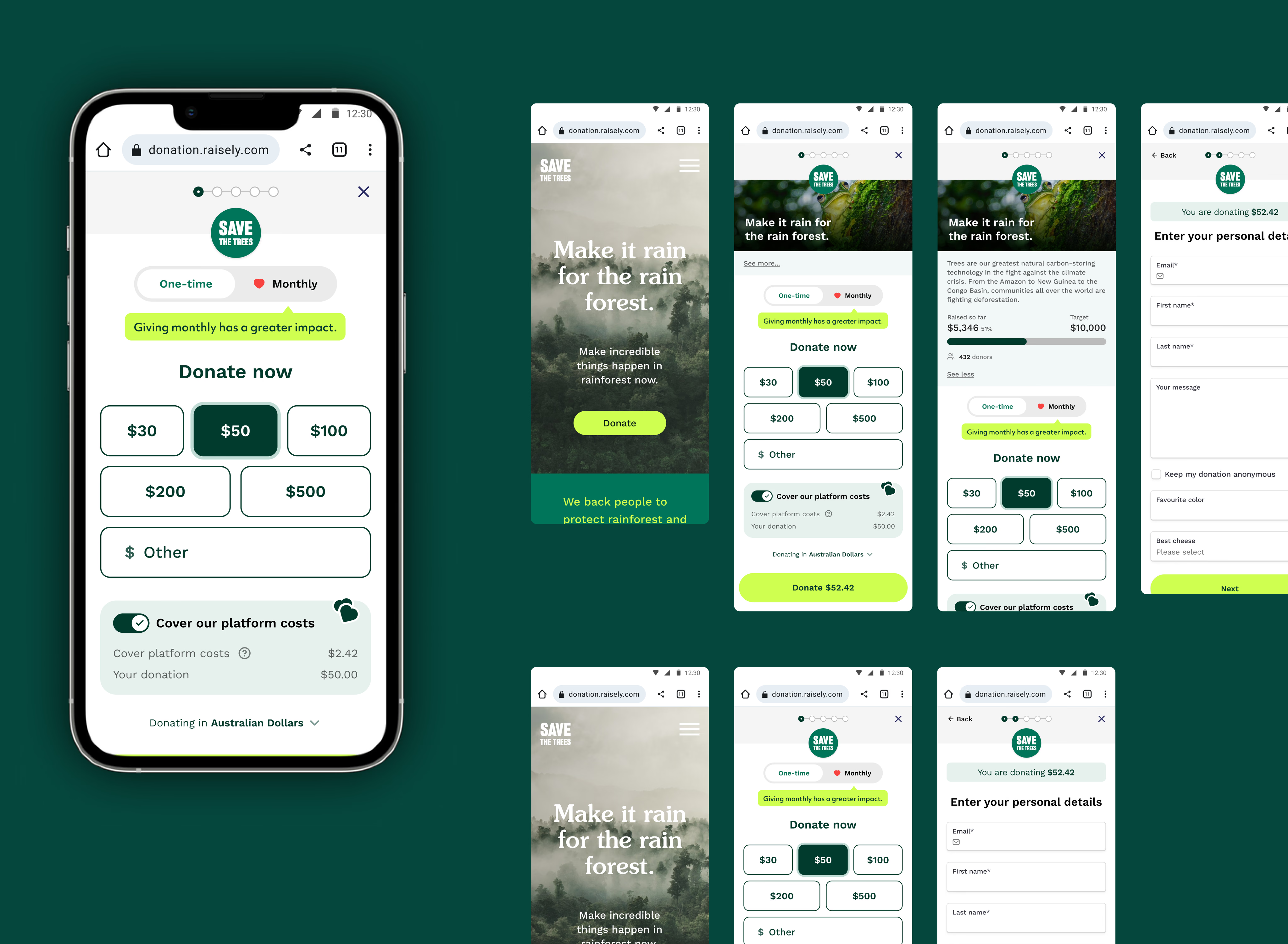
- I took best practices from e-commerce and tailored them for nonprofits
- New mobile first-design with express checkout options and friction-free interfaces through streamlined layouts
- Improved white-label flexibility through a modular layout and ensured accessibility through smart colour defaults
Results
- 20% increase in conversion rate compared to the previous form
- 19% increase in average donation size
- 48% increase in overall fundraising per unique visitor
- A personal shoutout from Doctors Without Borders
Process
Discovery
Event tracking on the existing form was very rudimentary. We knew that ~65%+ of donors were coming from mobile devices, but we didn’t have any data on which steps of the form donors were dropping off from. To workaround the lack of data, I transferred insights from large-scale industry studies on e-Commerce Checkout Usability to improve our form UX.
To understand what was difficult for administrators in setting up and styling the form, I spoke to a range of users to understand their specific needs. The common theme was that our form needed to support a huge range of edge cases and our customisation settings needed to work for people with little tech-literacy to people who were used to writing custom CSS.
I synthesised this research, combined with customer complaints, competitor analysis, and what we already knew, into these key insights:
Key insights
- 01
Lack of trust directly impacts conversion
Poor UX and form appearance contributed to a lack of trust. We needed to create trust for the donor that their donation and their data will be secure.
- 02
The form was difficult to customise
Unless you knew how to apply custom CSS. The application of brand colours changed from template to template and caused frustration. We needed to simplify how we applied brand colours to our Donation Form.
- 03
65%+ donors came from mobile devices
But some parts of the form were not optimised for mobile tap areas, with interactive elements being too small.
- 04
The form was often ugly
Messy layouts across screen sizes, inaccessible colour contrast, confusing error messages, lack of branding consistency. With a fully customisable form we needed to consider every edge case to ensure the design was robust and would still look great.
Implementation
Our success metrics were straightforward: increase conversion rate and average donation amounts without compromising overall conversion rates. Based on this, I set the principles to guide our work and create parameters for how we evaluated our ideas.
Goals & principles
- 01
Conversion
Maximise donor conversion and lifetime value
- 02
Trust
Build trust through delightful experiences and smooth UX
- 03
Flexibility
Easier ways to customise the look and feel of your donation form
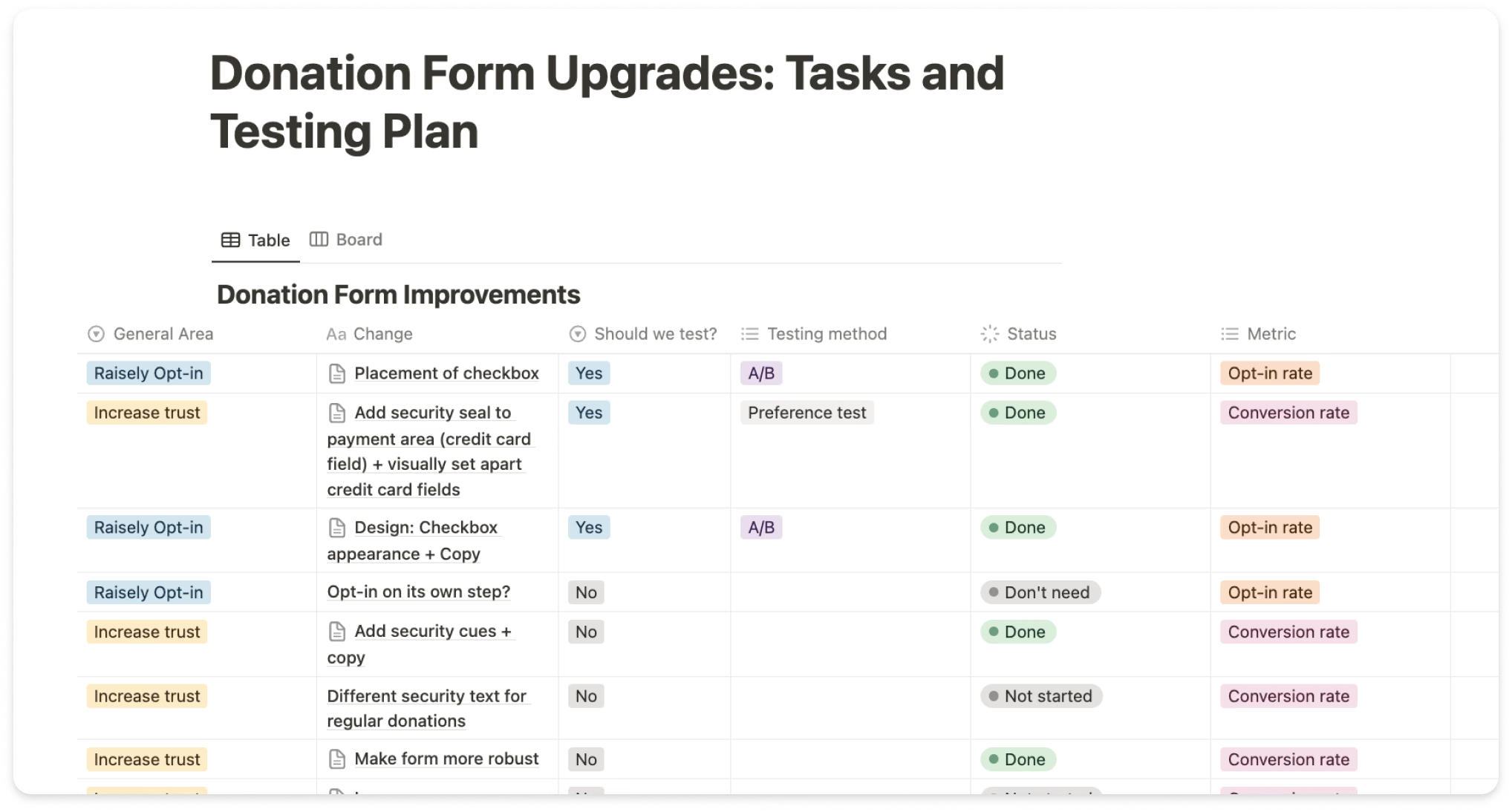
Facing 20+ potential improvements, I needed a systematic way to prioritise. I created a database mapping each idea to specific user challenges and research insights. Working with our data scientist and our tech lead, I established validation frameworks and estimated engineering effort for each solution. This enabled us to move forward with the highest impact changes.
For validation, we chose A/B testing because it allowed us to measure actual donor behaviour with real money — not just stated preferences. With our high donation volume, we could isolate the impact of specific design changes across diverse campaigns, giving us statistically significant results for our key metrics. This approach ensured we were making evidence-based decisions rather than relying on assumptions about what would work.
Solution
I worked closely with engineering, leadership and data scientists — making sure everything was technically viable but also reflected the needs of our customers and non-profit industry. Working across multiple global timezones, a big part of my approach was sketching, high-fidelity prototyping and video feedback.
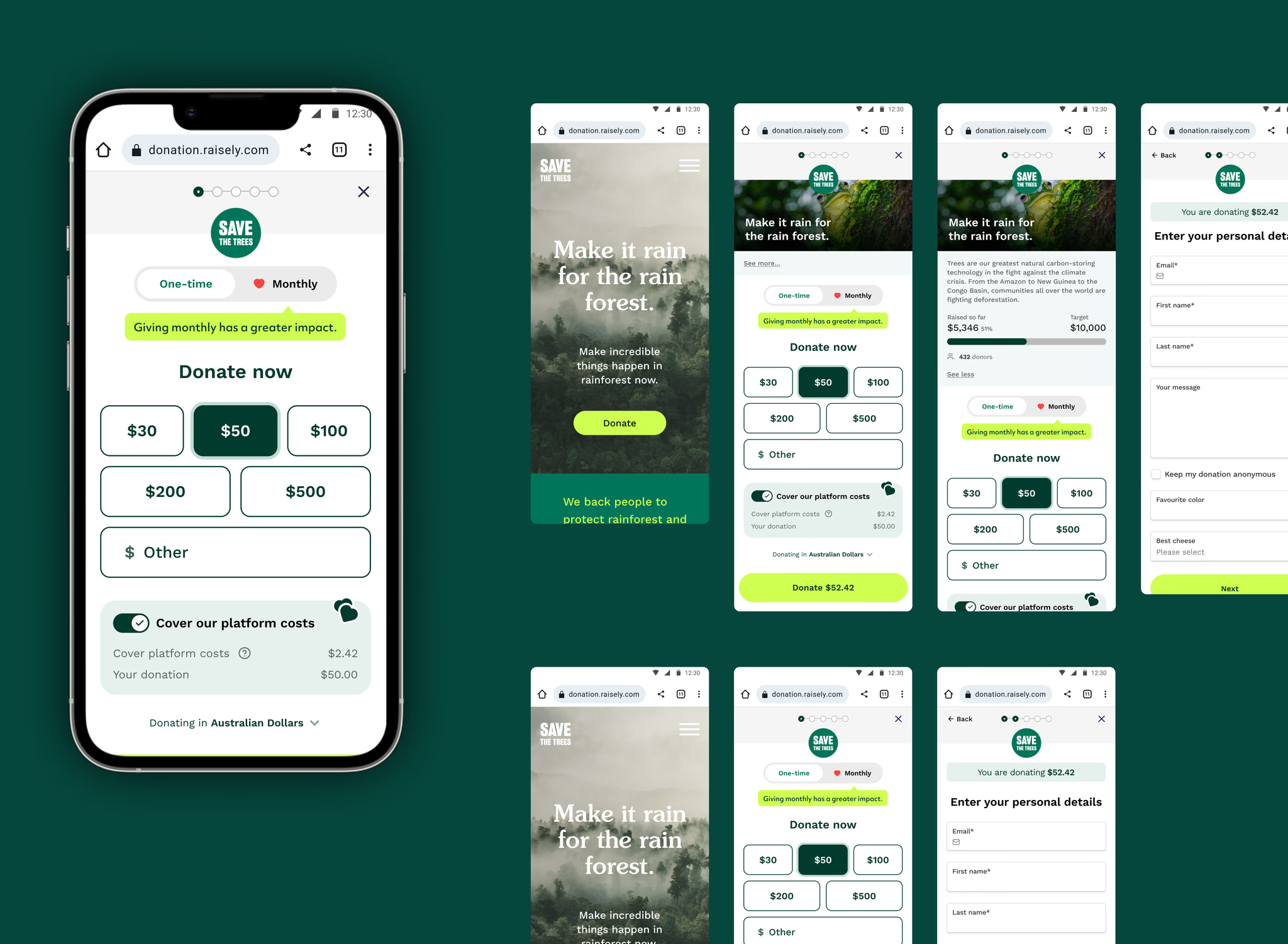
Designing for mobile first
A full-screen mode eliminates distractions and maximizes the limited screen space on phones. Increased touch target sizes ensure easier interaction, and responsive layouts seamlessly adapt to any device size now. The result is an intuitive, frictionless experience that feels natural whether you’re donating on a phone, tablet, or desktop.
Balancing intuitive design, customisation and accessibility
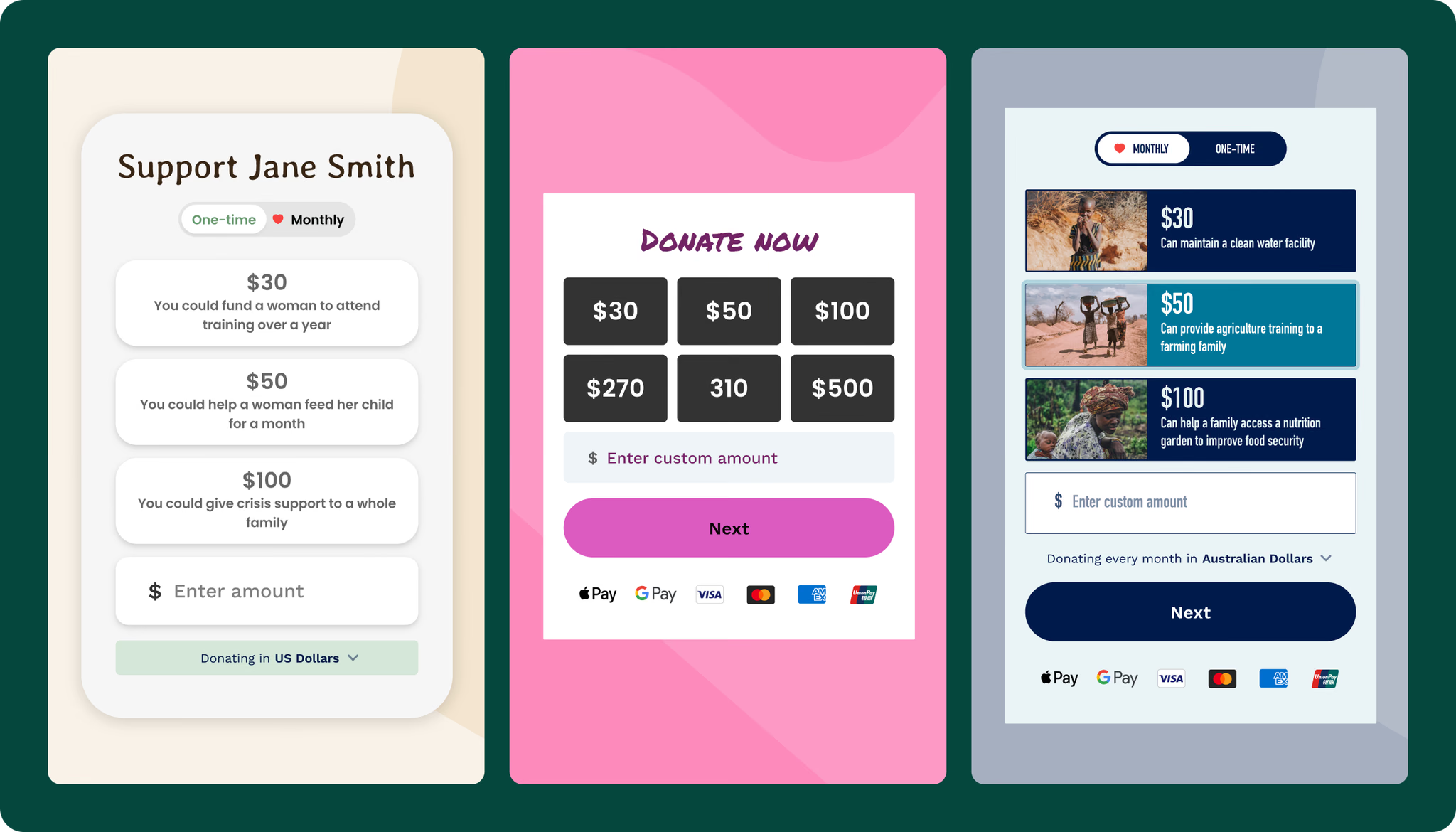
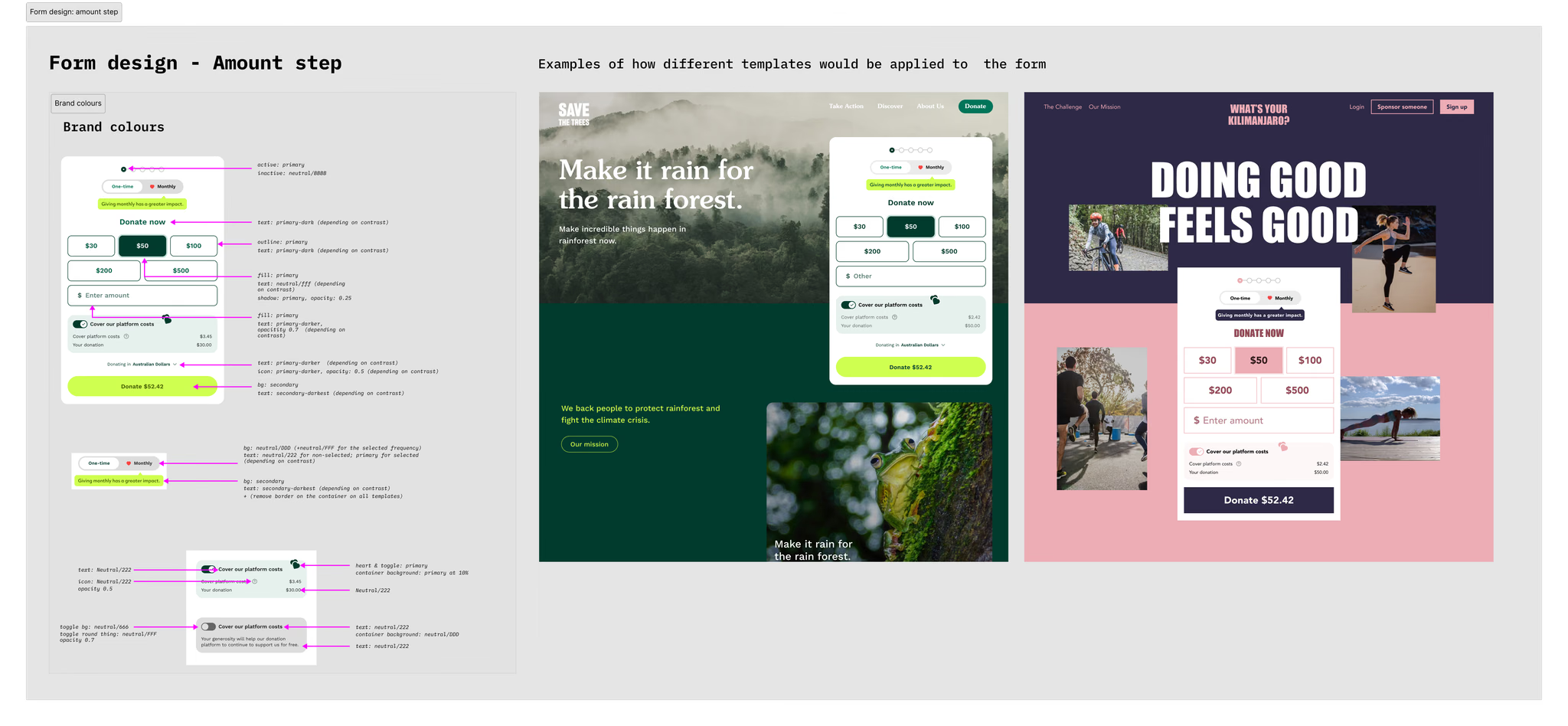
I built a system that works with each organisation’s brand colours and ensures accessibility. The modular layout handles different configurations while keeping the visual design consistent (a labour of many hours on my side trialling different variations). Under the hood, we use SCSS calculations to automatically generate accessible colour combinations that meet contrast requirements but stay on-brand.
The result? Organisations get the customisation they need without compromising accessibility or conversion optimisation. Below are just a few real-life examples of the new form:
Designing for trust & delight
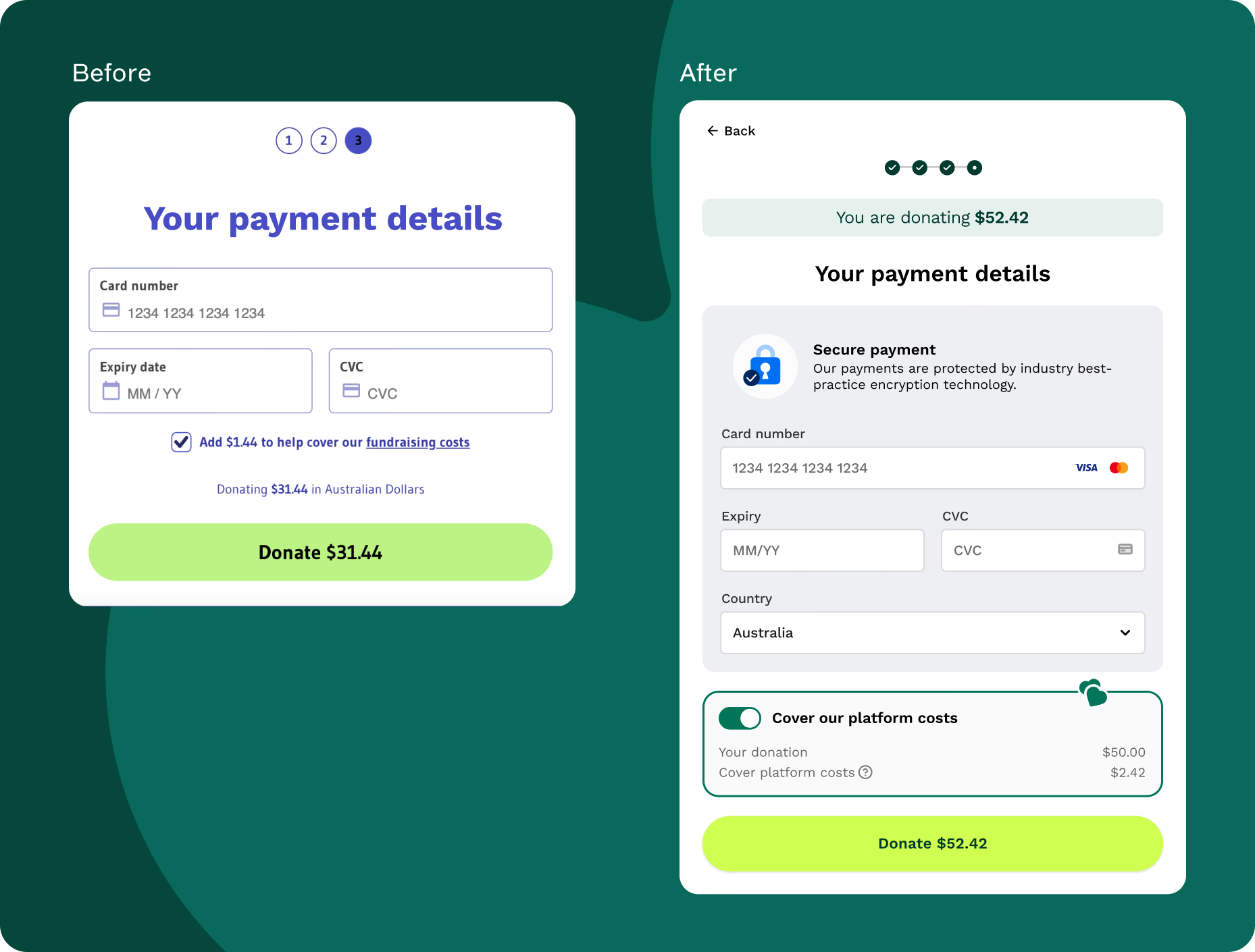
The most ambiguous challenge of this project was how we would make sure that donors felt safe. Emotion in design often gets pushed aside as being one of those ‘design-y’ things – but there’s real science backing that trust directly impacts conversion, and design in turn directly impacts the perceived trust. So how could we create trust for the donor that their donation and their data will be secure while they are filling out the form?
The answer is: through obsessing over the details.
Outcomes
A solid foundation for future iterations
Overall, the form was really well received by our customers. We improved all metrics that we set out as our benchmarks, not only during the experimentation phase but also in the long run. Apart from our own rigorous testing and experimentation, our form also outperformed custom-built forms in independent tests run by some of our customers.
What I would do differently next time: While we optimised the new form for conversion rate and donation value, next time I would also make time to complete donation a key metric to track, with a focus on keeping that time minimal. An increase in this metric can be a leading indicator to show that we need to streamline our flow.
Other work
- 2025–26AI-native analytics for non-technical teamsFilament
- An integrated ticketing experience for nonprofit eventsRaisely
- 2022–25A lightweight design system for a remote, growing teamRaisely
- 2023Converting one-time donors to recurring supportersRaisely